Your plan and what it includes
What this covers
Reading your subscription page: what you are on, what it costs, what is included, and where to check how much of it you are using.
Everything on this page needs the manage-billing permission, which belongs to the
Owner alone — not even a Manager has it. If Subscription is missing from your
settings menu, you are not an Owner (link The Owner account).
Find it at Property Settings → Subscription
(/settings/subscription).
What the page shows
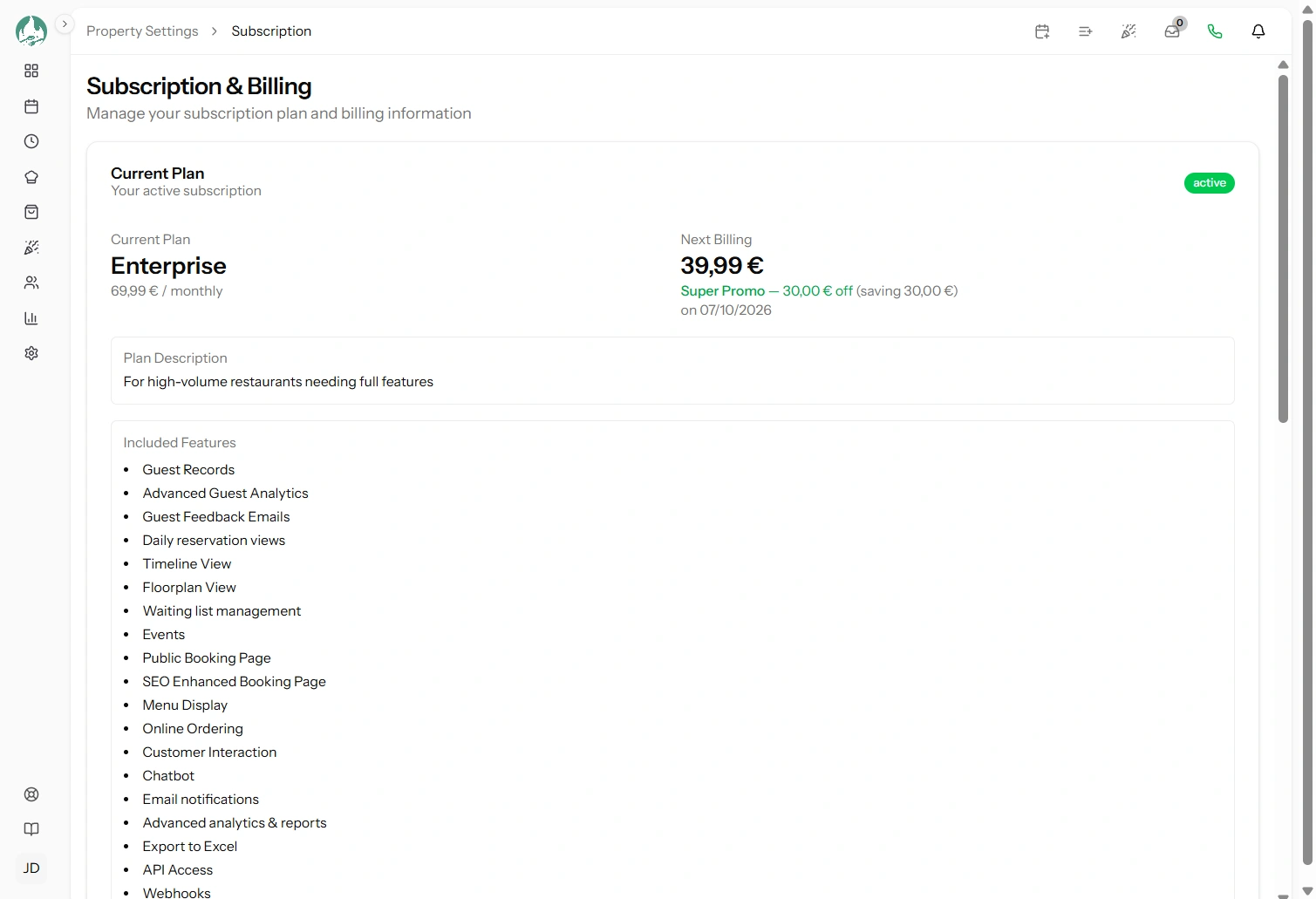
| Section | What it tells you |
|---|---|
| Your plan | Its name, price, and whether you pay monthly or yearly |
| Status | Active, on trial, or scheduled to cancel |
| Trial ends | The date your trial finishes, if you are in one |
| Next invoice | The amount and date of your next charge, and any discount currently applied |
| Payment method | The card's brand, last four digits and expiry (link Payment method) |
| Included features | Everything your plan gives you, in order |
Reading your feature list
The included-features list is the authoritative answer to "should I have this?". If something is not on that list, it is not on your plan — which is the commonest reason a menu item or a report is missing (link A feature or menu item is missing).
Some entries name a number rather than just appearing — "5 users", "50 tables". Those are your limits, and they are enforced, not advisory.
Where to see your usage
Worth knowing, because people look for it here and it is not here: the subscription page does not show how much of your plan you are using. There is no usage dashboard.
Instead, each limit is shown on the page where it matters — at the moment you would hit it:
| Limit | Where you see it |
|---|---|
| Staff accounts | Property Settings → Staff: the count and a warning when you are at the limit (link Adding staff accounts) |
| Tables | Property Settings → Tables, the same way (link Managing your tables) |
| Bookings per month | Your Dashboard and the Reservations page, with this month's count (link The Dashboard) |
| SMS credits | Property Settings → SMS Credits: balance, monthly allowance and history (link How SMS credits work) |
That is arguably the more useful arrangement — you are told when you are close to a limit while doing the thing the limit applies to — but it does mean there is no single screen to review before a busy season. If you want one, check those four pages.
What "unlimited" looks like
Some plans set no limit on something. Then nothing counts and nothing warns you — the feature simply works without a ceiling.
If you are on a trial
The page shows your trial end date. Two things to know:
- You have full access to your plan's features during the trial — nothing is held back.
- When it ends, your card is charged and the subscription continues. Add a payment method before then, or the first charge fails and you begin the failed-payment sequence (link A failed payment, and suspension).
A trial is the right time to test the features you are paying for — set up a menu, try the floor plan, send yourself a booking confirmation. Discovering in month three that you needed a different plan is avoidable.
Comparing plans
Choose to change or view plans and you get the comparison, priced in your own billing currency, with your current plan marked (link Changing your plan).
The public pricing page shows the same comparison if you want to look without being signed in.
Good to know
Prices are shown in your billing currency, which was set when you subscribed and does not change (link Currency and pricing).
This is separate from your restaurant's currency setting, which is what your menu prices and revenue reports use. The two are unrelated.
SMS credits are not part of your subscription charge. Packs are one-off purchases, and a monthly allowance included in your plan arrives separately (link How SMS credits work).
If the page cannot reach the payment provider, some detail — your next invoice, your card — may be missing while the plan itself still shows. Reload before concluding anything is wrong.