Caller screen-pop, explained
What this covers
What phone integration does, what you need for it to work, and what it deliberately does not do.
Requires the Phone Integration feature on your plan. Anyone can benefit from it;
only an Owner or Manager (the manage-settings permission) can set it up.
The idea in one sentence
When the restaurant phone rings, the caller's profile appears on your screen before anyone picks up.
So instead of "Hello, can I take your name?", the person answering already knows they are talking to a regular who has been in eleven times, never cancelled, usually spends around the same amount, and has a table booked for Saturday. That changes the conversation completely, and it takes zero extra effort from your staff once it is set up.
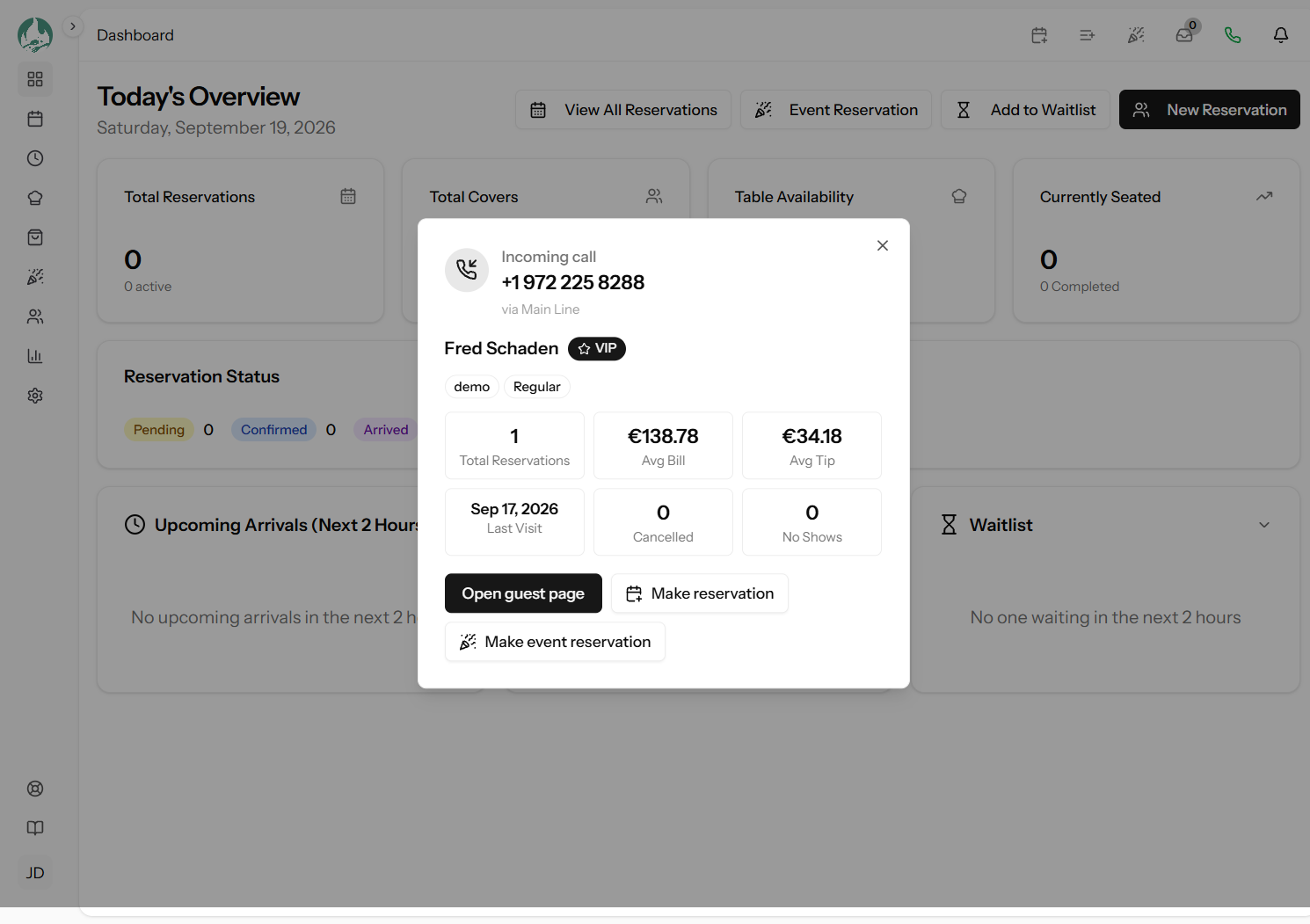
What appears on the pop
When the number matches one guest in your book, you see:
- Their name, and the number they are calling from
- A VIP badge if they are flagged as one, and a Blacklisted badge if they are flagged as that (link The guest profile)
- Any tags on their profile
- Total reservations they have ever made with you
- Their average bill and average tip, from completed visits
- Their last visit date
- How many bookings they have cancelled, and how many they have no-showed
- Their upcoming reservation, if they have one — date, time and pax
- Which phone line the call came in on, if you have labelled your lines
That last-but-one point is the one staff appreciate most. Someone ringing about a booking they already have is the commonest reason for a call, and the answer is on screen before they finish their sentence.
What you can do straight from the pop
Three buttons, so a call can be handled without hunting for anything:
- Open guest page — the full profile and visit history
- Make reservation — opens the normal booking form with the caller already filled in (link Creating a reservation)
- Make event reservation — the same, for a bookable event. This button only appears if your plan includes Events and you actually have an event open for bookings
Both booking buttons need the create-reservations permission, so a Waitstaff account
sees them too.
What it needs
One thing: a phone system that can visit a web address when a call comes in.
That sounds technical, and it is the only technical part. In practice most modern business phone systems can do it — it is a standard feature usually called a "webhook", an "HTTP request action", a "URL notification" or a "screen pop URL". If your phones run through an internet-based service (rather than a socket in the wall going straight to the phone company), the answer is very likely yes. Whoever set your phones up will know in about thirty seconds.
You do not need to change phone provider, buy hardware, or install anything on your computers. See Connecting your phone system for the setup and a checklist you can forward to them.
What it is not
Worth being clear, because the name suggests more than it does:
- It does not make or receive calls. Your phones carry on working exactly as they do now. This only watches for the ring and shows you who it is.
- It does not record calls, and it does not keep a call log. Nothing about the call is saved anywhere (link Several matches, and caller privacy).
- It does not replace caller display on your handsets. It adds a screen in front of the person answering, which is a different and more useful thing.
- It has no connection to SMS. Text messages to guests are a separate feature entirely.
Good to know
It shows on the screens you choose, not all of them. Each device decides for itself whether it is answering calls tonight, so the host stand pops and the back office does not. See Choosing which screens pop.
A number that matches nobody still pops, showing the number and a button to create a guest from it — so a first-time caller becomes a profile in one click rather than being retyped. You can turn that off; see Pop behaviour settings.
Nothing breaks if it stops working. If your phone system changes, your internet drops, or a trigger is revoked, the pop simply does not appear and the phone rings as it always did. There is no state for it to get stuck in.
Where to go next
- Connecting your phone system — the setup
- Pop behaviour settings — how intrusive it should be
- Testing it — proving it works
- A feature or menu item is missing — if Phone is not in your settings menu