Connecting your phone system
What this covers
How to create the web address your phone system calls, and exactly what to tell whoever
administers your phones. Requires the Phone Integration feature and the
manage-settings permission (Owner or Manager).
You do not need to understand the technical half. Your job is to generate an address and hand it over; their job is to make the phone system visit it. This article gives you both halves so you can forward the second one.
Step 1 — Create a trigger URL
A trigger URL is a secret web address unique to your restaurant. Anything that visits it makes a call pop on your screens. Think of it as a doorbell button with a very long, unguessable name.
- Go to Property Settings → Phone (
/settings/phone). - Under Trigger URLs, type a Label — a plain-English name for where calls will come from, such as Main line, Bar extension or 3CX main line.
- Click Create trigger URL.
- The full address appears. Copy it now. It is shown once and never again.
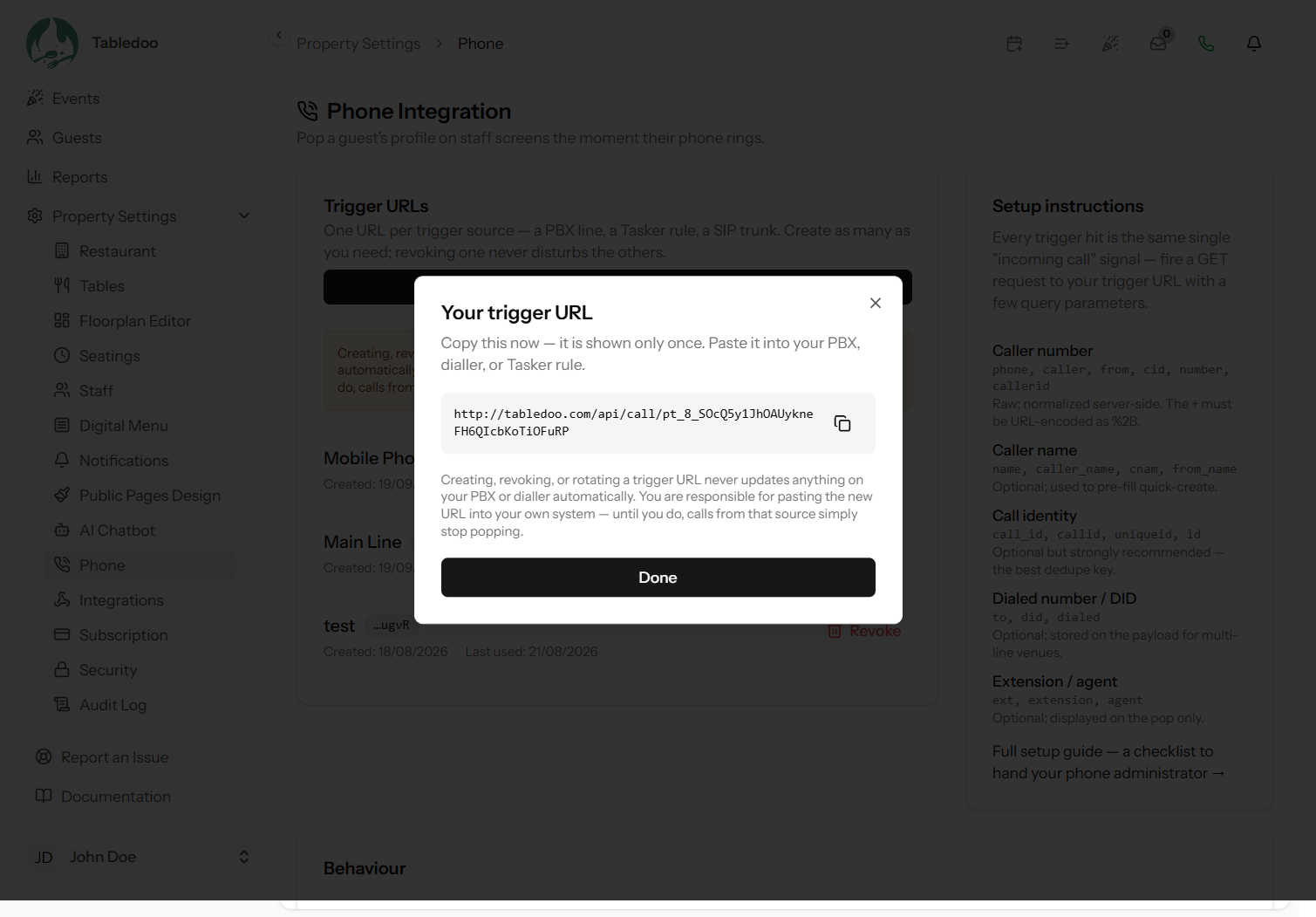
The label matters more than it looks: it appears on the pop itself as "via Main line", so on a multi-line venue the person answering can see which phone is ringing before they reach for it. Create one trigger per line or handset you want to tell apart.
Why it is only shown once
We keep a scrambled copy that can verify the address but cannot reproduce it — the same way a password is stored. That means nobody, including us, can look it up for you later. If you lose it, revoke that trigger and create a new one. That is a thirty-second job, so do not be precious about it.
Step 2 — Hand it to whoever runs your phones
Paste the address into your phone system's outbound-webhook setting. What that setting is called varies by system, so the checklist below is written to be forwarded as-is.
Everything from here to the end of the checklist is for your phone administrator, not for you.
Checklist for the phone administrator
- On an inbound call ringing event, fire a plain HTTP GET request to the URL supplied.
- Append the caller's number as a query parameter. Any of these key names works — the first
non-empty one wins:
phone,caller,from,cid,number,callerid. - URL-encode the leading plus sign as
%2B. This is the single most common mistake, because an unencoded+arrives as a space and the number is read as a local one. - Optionally also send:
- the provider's own call identifier —
call_id,callid,uniqueidorid. Strongly recommended: it is what stops one real call popping twice. - the caller name from CNAM —
name,caller_name,cnamorfrom_name. Used to pre-fill a new guest. - the number that was dialled —
to,didordialed. Useful on multi-line venues. - the extension or agent —
ext,extensionoragent. Shown on the pop.
- the provider's own call identifier —
- Numbers are normalised on our side against the restaurant's default dial country, so send the
number in whatever format the switch produces — E.164, national, with or without a
00/011prefix. Do not reformat it. - Response codes:
404means the URL is wrong or revoked,403means the plan does not include the feature,429means throttled. Every other outcome returns200— including "no guest matched", "duplicate" and "integration switched off" — so a200is not by itself proof that a pop appeared, and a non-2xx is always worth investigating. - Rate limits are 60 requests per minute per trigger URL and 120 per minute per source address. Normal call volume is nowhere near this.
- Nothing needs to be sent when the call ends, and no response body needs to be parsed.
The settings page itself shows this same parameter list as a table, so your administrator can read it there rather than from a forwarded message.
Step 3 — Check it arrived
Once they confirm it is configured, place a real call to the restaurant and watch a screen that is answering calls. Then look at the trigger's Last used time on the settings page — see Testing it, which also explains the one thing about that timestamp that catches people out.
Managing trigger URLs
The list shows each trigger's label, the last four characters of its address (enough to tell two apart, not enough to use), when it was created, and when it was last used.
Revoking one
Click Revoke. It stops working immediately and permanently, and other triggers are unaffected.
Revoking does not touch your phone system. Nothing reaches into your switch to remove the old address — that is not something we can do. Until someone updates it on your side, your phone system carries on calling a dead address and calls simply stop popping, with no error anyone will notice. So the order of operations matters:
- Create the new trigger URL first.
- Put it into the phone system and confirm a call pops.
- Then revoke the old one.
Do it in that order and there is no gap. Do it the other way round and the phone is unwatched until someone finishes the job.
When to revoke
- Someone who had the address leaves, especially an outside phone contractor (link Editing and removing staff)
- You change phone system or provider
- You suspect the address has been shared beyond the people who need it
- You are retiring a line
Good to know
Anyone holding the address can make a pop appear. That is the whole design — your phone system is not going to log in. It cannot read your data, change anything, or see a guest profile; the worst it can do is make a spurious pop appear on screens that are answering calls. Still, treat the address like a password: do not put it in a shared spreadsheet or a public ticket.
Set your default dial country first. Numbers arriving without a country code are interpreted against Property Settings → Restaurant → Default phone country. Get that wrong and local numbers will not match your guests. See Timezone, currency and formats.
Short numbers are ignored on purpose. Anything with fewer than six digits — an
internal extension, 100, a feature code — is treated as "no usable number" rather than
being matched against your guests. Internal transfers between your own handsets will not pop as
mystery callers.