Several matches, and caller privacy
What this covers
What happens when one phone number belongs to more than one guest, how repeated signals from a phone system are prevented from popping twice, and exactly what is and is not kept about a caller. Requires the Phone Integration feature. No special permission.
When one number matches several guests
This is common and entirely normal:
- A couple who each booked using the same home or mobile number
- A family where several people use one number
- An office or hotel concierge booking for different guests
- A duplicate profile created because the same person booked twice with different details (link Finding a guest)
Rather than guessing, the pop shows a list of candidates with each one's name and total number of reservations. Click the right person to open their profile.
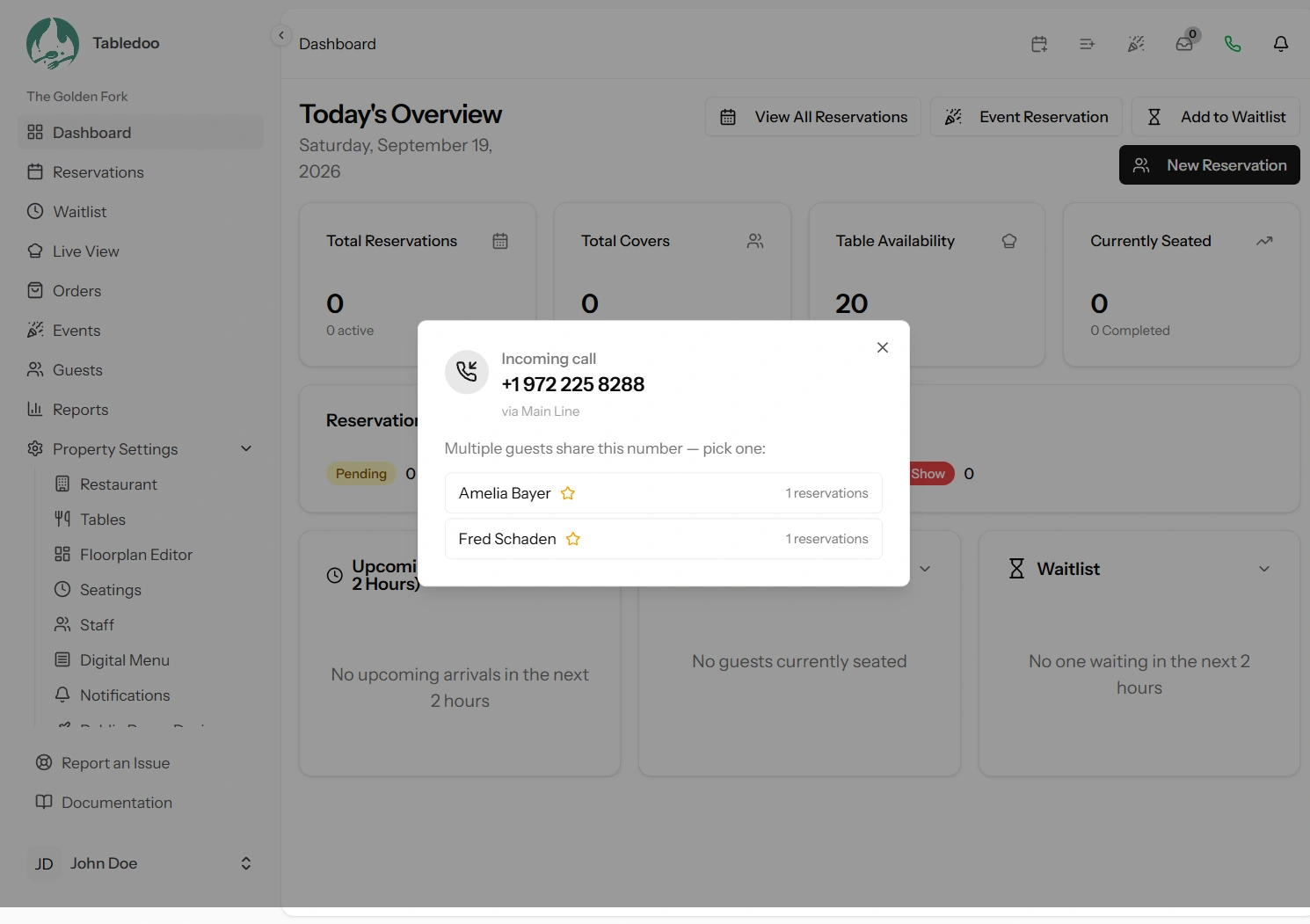
How the list is ordered
Deliberately, so the most likely caller is at the top:
- VIPs first. If one of them is flagged VIP, they lead.
- Then most recent visit. Someone who ate with you last week is a likelier caller than someone who came two years ago.
- Then alphabetically, so the order never shuffles between calls.
How to pick correctly
Ask. "Hello, is that Mrs Patel or Mr Patel?" takes two seconds and is better than opening the wrong profile and adding a note to the wrong history.
If you realise afterwards that two entries are genuinely the same person booking twice, tidy it up: keep the profile with the real history, correct its details, and stop using the other. There is currently no merge tool, so the visit counts stay split until you do.
Why one call never pops twice
Some phone systems report the same ringing call more than once — once per handset it rings on, or once per retry. Left alone that would produce a burst of identical pops.
Two safeguards stop it, one on each side:
- On our side: repeat signals about the same call within 90 seconds are recognised and ignored. If your phone system sends its own call identifier that is used to recognise them, which is exact; without one, calls from the same number within about 45 seconds are treated as the same call.
- On each screen: a screen that has already shown a given call will not show it again, even if the connection drops and reconnects.
This is why sending the provider's call identifier is worth asking for — it is the difference between exact duplicate detection and a sensible guess. See Connecting your phone system.
One consequence worth knowing: if the same person genuinely calls twice within a minute and a half — they were cut off and rang straight back — the second call may not pop. Rare, and the alternative is a screen full of duplicates.
What is kept about a caller
Callers are often not your guests, and have not agreed to anything with you. So the honest answer matters, and it is a short one.
No record of the call is kept at all. There is no call log, no call history, and no stored list of numbers that rang you. The caller's number travels to the screens that are answering calls, is displayed while the pop is open, and is gone when the pop closes. Close it and the number is not retrievable from anywhere in the app.
The only exception is deliberate and yours: if you press Create guest or Make reservation, you have chosen to save that number to a guest profile, and it is then ordinary guest data like any other (link The guest profile).
Our own technical logs — the diagnostic record engineers read when something breaks — record only the last four digits of the number plus a scrambled fingerprint that cannot be turned back into a number. Enough to trace one call's path through the system; not enough to identify anybody.
What this means in practice
- You cannot produce a list of who called you. That is not a missing report; nothing is recorded to report on.
- You cannot look up a caller's number after closing the pop. If you need it, save it while the pop is open.
- A screen that is not answering calls receives nothing (link Choosing which screens pop).
- Nothing about the call is sent to anyone else, and no call audio exists anywhere in the system.
Two things do get stored, and neither is about a caller. Your trigger URLs keep a label and their last-used time. Your guests' own saved numbers are kept in a second, simplified form so that fuzzy matching can work quickly — that is their number, which you already hold, not a caller's.
Good to know
A withheld number cannot be matched. A caller who blocks their number gives us nothing to match on, so the pop can only say so. Whether it pops at all is your choice (link Pop behaviour settings).
A blacklisted caller is flagged clearly. If the matched guest is blacklisted, the pop says so before the call is answered — which is the point at which that information is actually useful.
Tell your staff the number is not saved. Guests occasionally ask how you knew who was calling, and "your number shows on our screen and is not stored" is a better answer than a vague one.