Pop behaviour settings
What this covers
Every switch on Property Settings → Phone (/settings/phone), what
it actually changes, and what to set it to. Requires the Phone Integration feature
and the manage-settings permission (Owner or Manager).
These are restaurant-wide: they apply to every screen. The separate choice of which screens pop is made per device, and is covered in Choosing which screens pop.
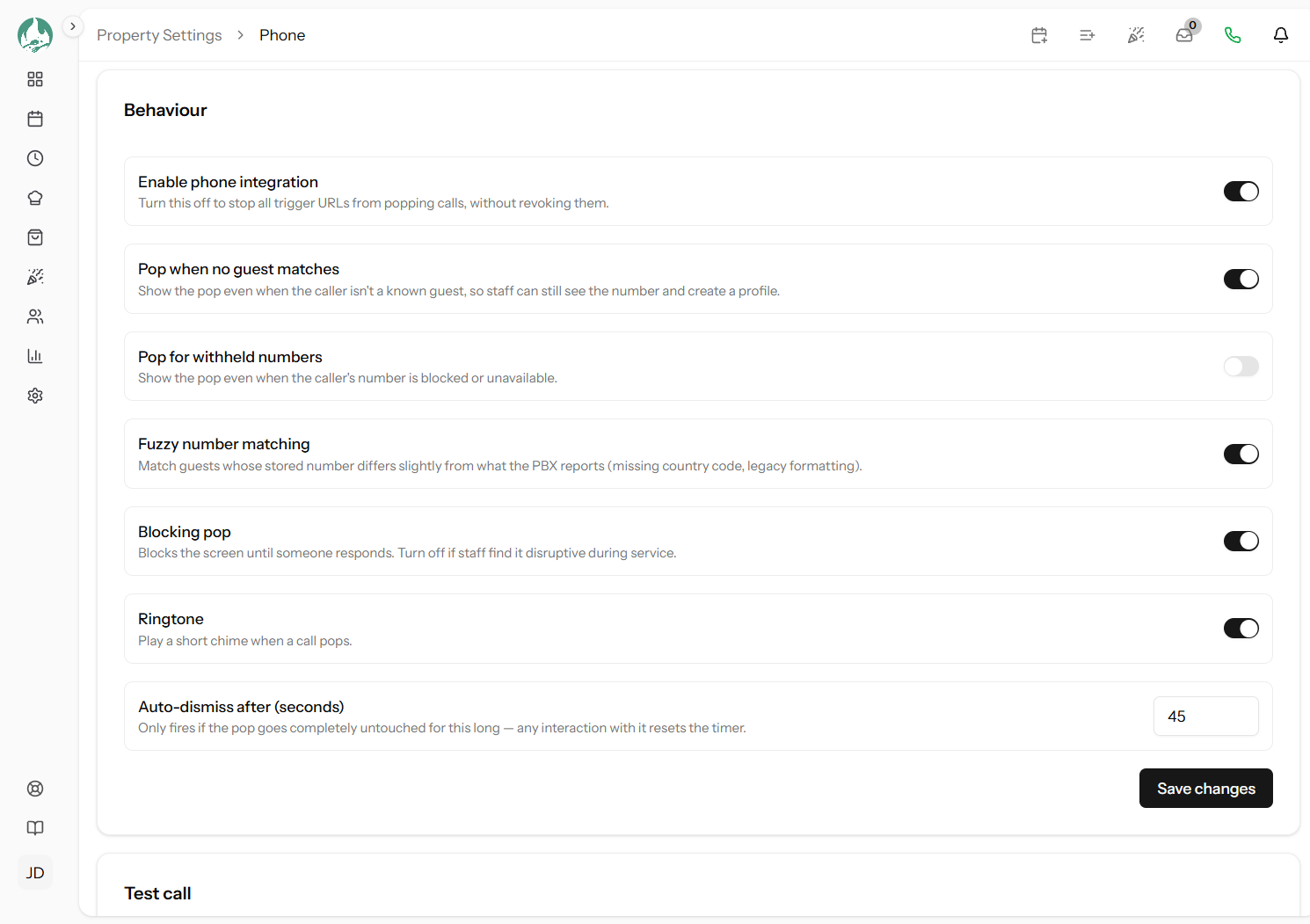
Enable phone integration
The master switch. Turning it off stops every trigger URL popping calls without revoking them — so it is the right control for a temporary pause, and revoking is the right one for "this address should never work again".
While it is off, the phone icon disappears from the top bar entirely, so staff are not left toggling something that cannot work. Turn it back on and everything resumes with no reconfiguring.
Recommended: on. Use it to pause during a private event, a refurbishment, or while you sort out a misbehaving phone system.
Pop when no guest matches
Whether a call from a number you have never seen still pops. If it does, the pop shows the number with a Create guest button that opens a new guest form already filled in with the number — and with the caller's name too, if your phone system sends one.
Recommended: on, for almost everyone. It is how your guest book grows without anybody retyping a number, and a first-time caller is exactly the person you most want a record of. Turn it off only if you take a high volume of calls that are not from guests at all — suppliers, recruiters, cold callers — and staff are learning to ignore the pop, which is worse than not having it.
Pop for withheld numbers
Whether a call with no readable number still pops. "Withheld" covers a caller who has blocked their number, a system that sends Anonymous, Private, Unavailable or similar, and a number too mangled to read.
There is nothing to match against, so the pop can only say the number was withheld and offer Create guest.
Recommended: off, which is the default. A pop that cannot tell you anything is an interruption without a payoff. Turn it on only if your staff would rather have the heads-up that a call is incoming at all.
Fuzzy number matching
Whether to match a guest whose stored number is written differently from what your phone system reports.
This exists because phone numbers get stored inconsistently. A number imported from an old
booking system might be saved as 07700 900123 while your phone system reports
+44 7700 900123. Those are the same phone and different text. With this on, they match
anyway.
It is careful rather than loose: it finds likely candidates by the end of the number, then confirms an exact match on the full national number before accepting. Two different people who happen to share the last six digits will not be confused for each other.
Recommended: on. Turn it off only if you are confident every number in your guest book is stored in full international format, which in practice means you have never imported a list.
Blocking pop
Whether the pop takes over the screen until someone deals with it.
| Setting | Behaviour | Suits |
|---|---|---|
| On (default) | Dims the page behind it; you must close it or act on it before using the rest of the app | A dedicated host-stand screen whose whole job is arrivals and calls — impossible to miss |
| Off | Appears over the page; you can carry on working behind it and ignore it entirely | A screen someone is actively working on — a manager doing tomorrow's plan, a kitchen screen |
Recommended: on if you have a screen dedicated to the host stand, off if your only screen is also the one people work on. If staff start complaining the pop is in the way, this is the switch they mean.
Ringtone
Plays a short chime when a call pops.
Useful when the screen is not in someone's line of sight. Less useful in a quiet dining room where guests will hear it — and remember the phone is already ringing, so the chime is a second noise about the same event.
Recommended: off, which is the default, unless your host stand screen sits out of view.
Auto-dismiss after (seconds)
How long an untouched pop stays before closing itself. Between 5 and 300 seconds; the default is 45.
The word untouched is the important one. Any interaction with the pop resets the timer — even moving the mouse over it. So it is not a deadline for dealing with the call; it is only a tidy-up for a pop nobody went near, which is what you want when a call is answered on a handset across the room and nobody touches the screen at all.
Recommended: 45 seconds suits most venues — roughly how long a call rings plus a moment. Raise it to 90–120 if your staff often take a while to reach a screen. Lower it to 15–20 on a shared screen where a stale pop is in the way, and consider turning off Blocking pop instead.
Two combinations that work
A busy venue with a dedicated host-stand screen: integration on, pop on no match on, withheld off, fuzzy matching on, blocking on, ringtone on, auto-dismiss 45. The screen's job is to be interrupted, so let it be.
A quiet restaurant with one shared screen: integration on, pop on no match on, withheld off, fuzzy matching on, blocking off, ringtone off, auto-dismiss 20. The pop informs without ever getting in anyone's way.
Good to know
Click Save changes when you are done — the toggles do not save themselves. The new settings reach every screen on its next page load, so a screen left open on one page may keep the old behaviour until it navigates or is refreshed.
Where to go next
- Testing it — try a setting without waiting for a call
- Choosing which screens pop
- Several matches, and caller privacy