Buying credit packs
What this covers
Buying extra SMS credits: the packs, the payment, and what to expect afterwards. Requires the
manage-billing permission.
Before you start
Two things worth knowing, because they remove the two most common worries:
- A credit pack is a one-off payment, not a subscription. Nothing recurs, and there is nothing to cancel later.
- Packs are available on any plan, including while you still have a monthly allowance. Buying does not replace or interrupt your allowance — the credits simply add together (link Your monthly allowance).
Buying a pack
- Go to Property Settings → SMS Credits
(
/settings/sms-credits). - Under Buy Extra Credits, look at the packs. Each shows how many credits it contains, the price, and the cost per credit.
- Choose one and start the purchase.
- A secure card payment form opens inside the page — you are not sent off to another website. Enter your card details and pay.
- You are returned to the SMS Credits page with a confirmation, and your new balance is already showing.
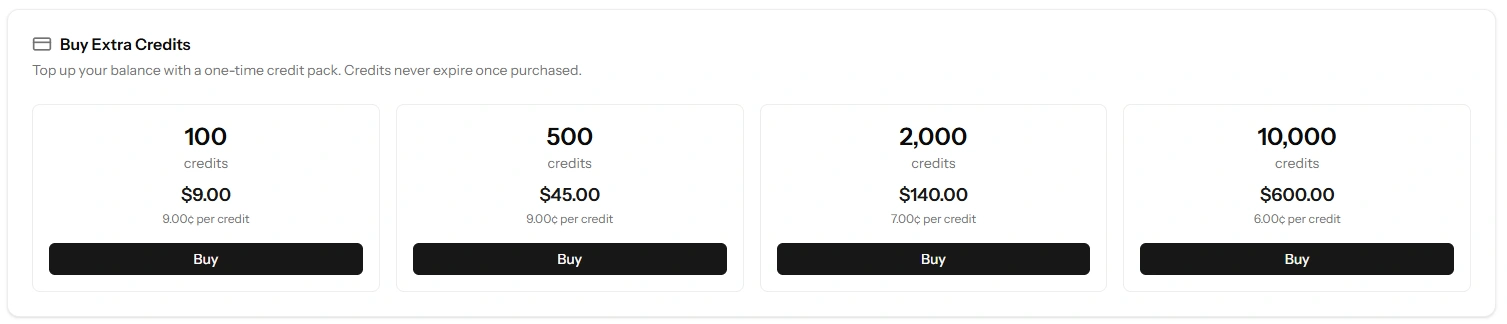
Larger packs cost less per credit
That per-credit figure is shown precisely so you can compare properly. A bigger pack is always better value per message — so if you are confident you will use them, the larger pack is the cheaper decision. And since credits never expire, buying ahead carries no risk of waste.
The one caution is cash flow rather than value: do not tie up money in ten thousand credits before you know your monthly rate. Buy a small pack first, watch your credit history for a month, then buy properly (link Your credit history).
When the credits arrive
Credits are added as soon as the payment is confirmed — normally before the page finishes loading, so your new balance is visible immediately.
If something interrupts you between paying and returning — you close the tab, your connection drops, your phone rings — the credits are still added. Payment confirmation reaches Tabledoo independently of your browser, and the two routes cannot both credit you: a paid pack is credited exactly once, never twice.
So if a payment went through and the balance looks unchanged, reload the page before worrying, and give it a minute. If it is still wrong after that, it is worth reporting with your card receipt to hand (link Reporting a problem).
Do not pay twice. If you are unsure whether a payment succeeded, check the Recent Activity list on the SMS Credits page — a successful purchase appears there as a Purchase entry.
Currency
Packs are priced in your billing currency — the one locked to your account when you subscribed. There is no currency choice at checkout, which keeps every charge and invoice on your account consistent (link Currency and pricing).
If a pack is not available in your billing currency you will be told so plainly rather than being charged in the wrong one. If that happens, report it — it means a price is missing, not that you are ineligible.
Receipts
The card payment produces a receipt from the payment provider, sent to your billing email. Credit pack purchases are one-off charges, so they appear alongside your subscription invoices (link Invoices and receipts).
Good to know
Purchased credits never expire. No deadline, no monthly reset, no forfeit.
There are no refunds for unused credits. They keep their value indefinitely instead — which is why buying a modest pack first is the sensible order of operations.
Only someone with billing access can buy. If a Manager needs to top up without calling the Owner, the Owner can grant them billing access (link Roles and permissions).
Buying credits does not switch SMS on. The message types stay as you left them — credits are the fuel, not the switch (link Turning messages on and off).