Your credit history
What this covers
The record of every credit movement on your account, what each entry type means, and how to work out
why your balance is not the number you expected. Requires the manage-billing
permission.
Find it under Recent Activity on Property Settings → SMS Credits
(/settings/sms-credits). It shows your 20 most recent movements, newest
first.
Reading a row
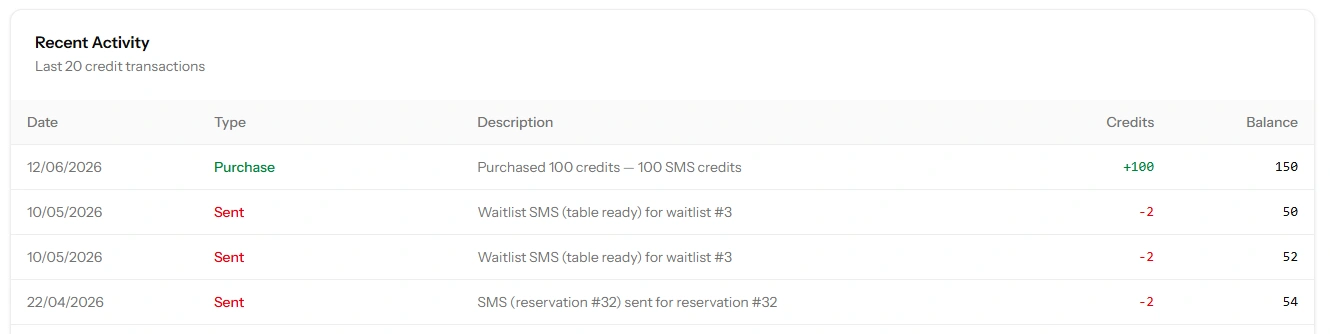
Every entry has four parts:
- Date — when it happened
- Type — what kind of movement it was, from the list below
- Description — the detail, including which booking a message was for
- Change and Balance — how many credits moved, and what your balance was afterwards
That last pair is what makes the list genuinely useful rather than merely informative: because every row carries the resulting balance, you can read down the column and see exactly where a number came from. No adding up required.
The entry types
| Type | Direction | What it means |
|---|---|---|
| Monthly grant | Added | Your plan's allowance, added on the 1st. The description names the month it was for |
| Purchase | Added | A credit pack you paid for. The description names the pack |
| Sent | Spent | A text went out. The description says which message type and which booking or waitlist entry it was for |
| Refund | Added back | A message was charged but the provider refused it, so the credits were returned. The description says why |
| Admin adjustment | Either | A correction made by Tabledoo support, with a description explaining it |
About refunds
Credits are taken before a message is handed to the provider, and returned if the provider rejects it. So a failed message shows as a pair — a Sent entry followed by a Refund — and your balance ends up unchanged.
Seeing these pairs is normal and nothing to act on. Seeing a lot of them is worth looking into: it usually means numbers are being saved in a form that cannot be delivered to, such as a missing country code or a landline in the mobile field (link SMS: what's different).
About admin adjustments
These only appear when support has changed your balance deliberately — making good on a problem, or correcting an error. Every one carries an explanation. If you find one you were not told about, ask (link Reporting a problem).
Reconciling a balance you did not expect
Work down this list. It resolves nearly every case.
"Lower than I thought"
- Count the Sent entries and their cost. Messages to distant countries cost up to three credits each, so 100 messages can be 300 credits (link What an SMS costs in credits).
- Check how many types you have switched on. Confirmation plus reminder is two texts per booking, not one.
- Look for updates and cancellations. A day of moving bookings around sends a text for each change — an easy source of unexpected spend.
- Look for repeated waitlist notifications. Each press of Notify is a separate charge.
"Higher than I thought"
- Look for a Monthly grant. Your allowance arrives on the 1st and adds to what you already had — it does not replace it, so balances grow over quiet months (link Your monthly allowance).
- Look for refunds. Messages that failed gave their credits back.
- Look for an admin adjustment.
"It has not moved at all"
If you expected texts to be going out and see no Sent entries, no text has been sent. The credits are not the problem — something upstream is. Work through Why a message wasn't delivered; the usual answer is that the SMS switches were never turned on, since they are all off by default.
This is the most useful diagnostic on the page. An empty history is positive proof that nothing was even attempted, which rules out half the possible causes in one glance.
What the history does not tell you
Being clear about the limits saves time:
- Only the last 20 movements are shown. On a busy restaurant with SMS fully enabled that can be a couple of days. For anything older, ask support.
- It records charges, not deliveries. A Sent entry means the message was accepted by the provider and you were charged — not that it reached the handset. There are no delivery receipts.
- Messages that were never attempted leave no trace. A text skipped because the guest opted out, or had no mobile number, or because your balance was empty, produces no entry at all. The absence of a row is not evidence that nothing was expected.
That last point deserves emphasis, because it is the one that misleads. If your balance hit zero mid-month, the history shows the messages up to that point and then simply stops — there is no "skipped" entry marking everything that did not go out. A quiet history can mean nothing happened, or it can mean a great deal failed to happen.
Good to know
Nothing in the history expires or is removed. No entry type reduces your balance through age — credits are only ever spent by sending.
Use it to size your next purchase. A month of real entries tells you your true monthly consumption, which is a far better basis for choosing a pack than any estimate (link Buying credit packs).
It is per restaurant. The history covers this restaurant's credits only.