Guest analytics and segments
What this covers
Who your guests are, how many come back, and the four segments worth acting on. Requires the
view-reports permission and the Advanced analytics & reports
feature.
The numbers at the top
| Card | What it counts |
|---|---|
| Guests | How many guest profiles match your filters, all time |
| Unique guests | Distinct guests who had a booking in your date range |
| New guests | Profiles created in your date range |
| Returning-guest rate | Share of your in-range guests who booked more than once within that same range |
| Avg bookings per guest | Bookings in range ÷ unique guests in range |
| Lifetime value | All-time recorded bills across your filtered guests, in total and per guest |
Two of these need care
The returning-guest rate is measured inside your date range, not across your history. Over a 30-day range it counts only guests who came twice in those 30 days — so a loyal regular who visits every two months counts as a one-off. A low figure on a short range is expected, not a problem. Use a range of six months or a year when you actually want to know your loyalty rate.
Lifetime value is diluted on purpose. It divides all-time recorded bills by every guest matching your filters — including everyone who never had a completed booking with a bill entered. So the figure falls every time your guest book grows, and it is only as complete as your bill entry (link Recording the bill and tip). Treat it as a trend line, not a valuation.
The four segments
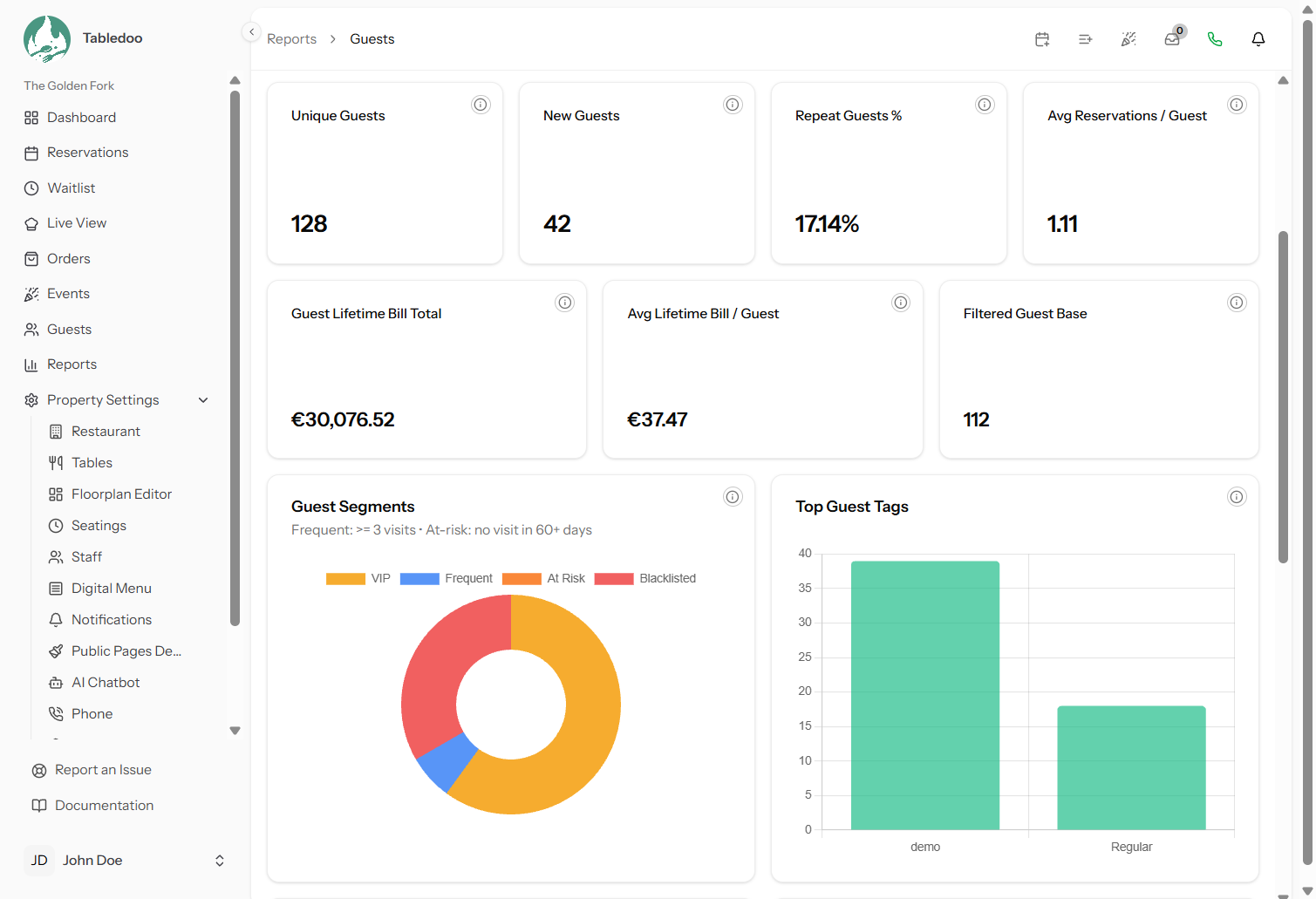
| Segment | Who is in it | What to do |
|---|---|---|
| VIP | Guests you have flagged as VIP | Make sure your floor staff know them by name. Review it occasionally — a VIP list nobody maintains stops meaning anything |
| Frequent | Guests with at least N bookings in your date range | Your actual regulars. The list worth knowing personally, and the one to consult before any change to the menu or the room |
| At risk | Guests whose last visit was more than N days ago | The commercially interesting one — see below |
| Blacklisted | Guests you have blocked | Review it once or twice a year. A blacklist entry from three years ago may not deserve to stand |
The two thresholds are yours to set
This is the part of the page most people miss, and it is what makes the segments useful rather than arbitrary.
- Frequent: minimum visits — anywhere from 2 to 20, default 3.
- At risk: days since last visit — anywhere from 7 to 365, default 60.
Set them to match your restaurant. A neighbourhood bistro where regulars come weekly might call three visits a month "frequent" and 30 days "at risk". A destination restaurant people visit twice a year should use two visits and 365 days, or its at-risk list will be its entire guest book.
Getting the at-risk number right is the whole trick. Too short and the list is everybody; too long and by the time someone appears they have already found somewhere else. A good starting point is roughly twice your typical gap between visits.
Working an at-risk list
Someone who used to come regularly and has not been seen is the easiest trade to recover — they already like you. But it needs judgement:
- Check the profile before contacting anyone. Notes may record that they moved away, or that the last visit went badly.
- A personal approach beats a mailshot. These are people you know.
- Respect opt-outs (link Guests who opt out).
- Do not chase. One approach. If they do not come back, they have answered.
At-risk is calculated from your guests' whole history, not your date range — it is a "right now" figure sitting among range-scoped ones, which is what you want. A guest with a booking already in the diary is not at risk, correctly.
Filters
- Date range — as everywhere, with the caveats above
- Guest status — all, VIP, non-VIP, blacklisted, or active
- Tag — narrow to one tag from your guest book
- The two thresholds above
Filters apply to the whole page and to the export, so the way to get a specific list is to filter until the screen shows what you want, then export (link Exporting report data).
The tables and the tag chart
Top guests by visits and top guests by spend — ten each, for your range, showing visits, bills, tips and total spend. They are usually different people, and the difference is worth noticing: your most frequent guest and your highest-spending guest deserve different attention.
Tag distribution shows your eight most-used guest tags — a quick check on whether your tagging is disciplined enough to be worth filtering by (link Guest tags).
Good to know
Duplicate profiles split everything. The same person booking twice under different details is two guests, with their visits and spend divided between them. It quietly deflates your returning-guest rate and can keep a genuine regular out of Frequent (link Finding a guest).
New guests counts profiles, not first visits. Adding someone to the book creates a profile whether or not they ever dine.
Cancellations and no-shows do not count as visits for last-visit purposes, so a guest who booked and did not turn up still ages towards At risk. Correct — they did not come.