Operating hours
What this covers
Setting the hours you are open, and how those hours bound every bookable time in the system. Requires
the manage-settings permission. Found at Property Settings → Restaurant,
below the profile fields.
How the table works
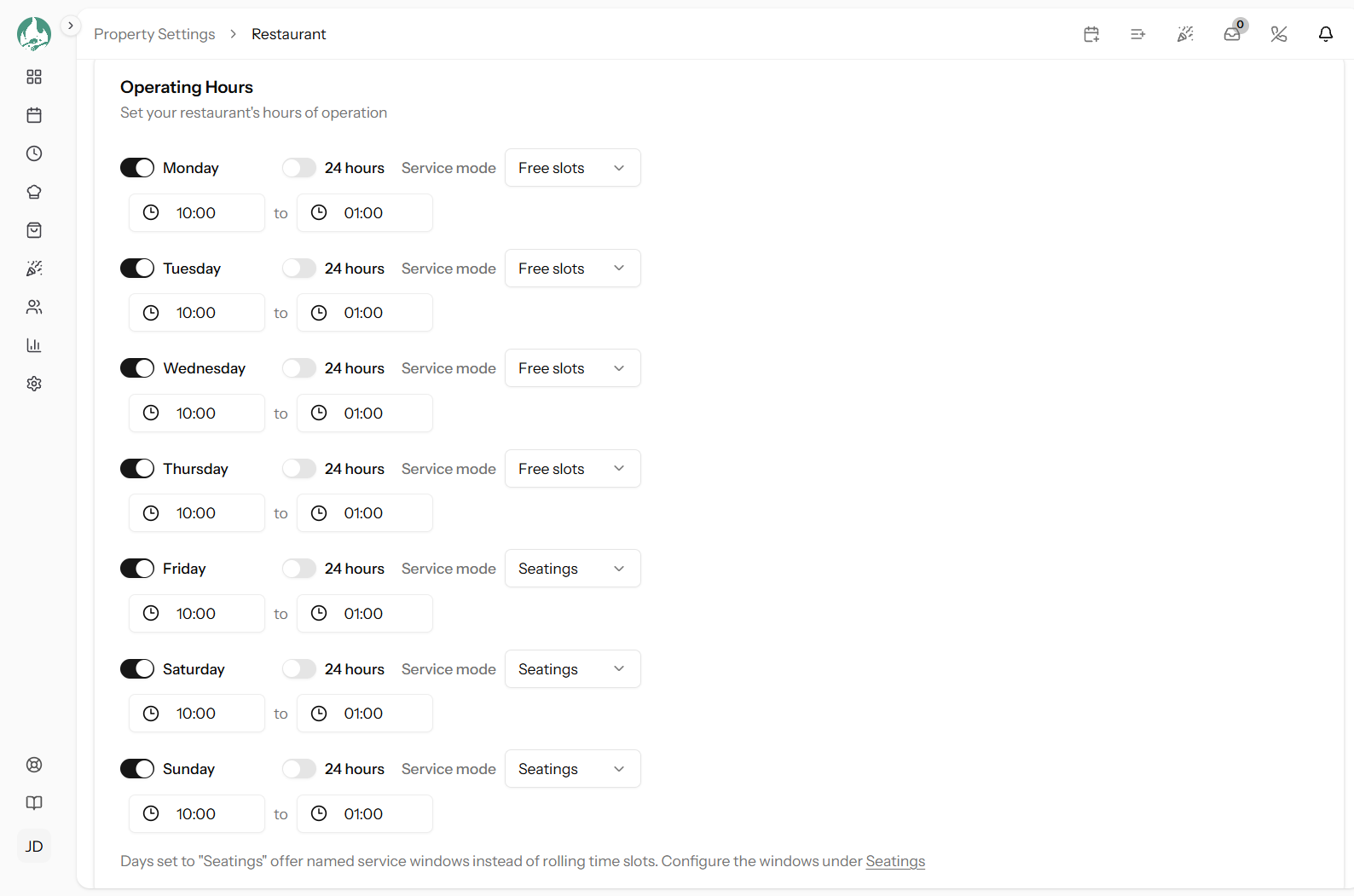
One row per weekday, each with:
- Open or closed — a switch for the whole day
- 24 hours — a flag for days with no closing time
- Open and Close times
- Service mode — rolling slots or fixed seatings, if that feature is on your plan (link Rolling slots vs fixed seatings)
The defaults are Monday to Thursday 11:00–22:00, Friday 11:00–23:00, Saturday 10:00–23:00 and Sunday 10:00–21:00, with every day open. Set yours before you take a single booking.
These hours bound everything
No bookable time exists outside them, on either side:
- The public booking page offers no times outside your hours
- Your staff are offered none either — this is not a guest-only restriction
- A closed day offers nothing at all, to anybody
- Your utilisation report measures how busy you were against these hours, so they define the denominator (link Utilisation report)
That makes this the first thing to check when a time you expected is not on offer (link Why a time or table isn't offered).
Open and close times are required
A day that is open and not marked 24 hours must have both times. Save without them and the page refuses and names the day.
Late-night closing
A closing time earlier than your opening time is understood as the next morning. A bar open 18:00–02:00 is eight hours, correctly — you do not need a trick for this, and you should not set the close to 23:59.
Split service
There is one open and one close per day, so a restaurant that serves 12:00–15:00 and then 19:00–23:00 cannot express the gap here. Your options, best first:
- Fixed seatings — the right tool. Define a lunch window and a dinner window, and the afternoon simply is not bookable (link Managing seatings). Needs the Fixed Seatings feature.
- Open 12:00–23:00 and accept afternoon bookings. Plenty of restaurants do this and just take the occasional 16:00 table.
- Open 12:00–23:00 with a pacing cap. Does not close the gap, but stops an afternoon being overrun (link Pacing: max covers per slot).
Do not try to fake a split by closing the day — you would lose lunch as well as the gap.
One-off closures
There is no holiday calendar. Nothing lets you mark a single future date closed and have it revert afterwards. What you can do:
| Situation | Do this |
|---|---|
| Closed for one day | Switch that weekday off, and switch it back on afterwards |
| Closed for a holiday period | Switch the affected weekdays off for the duration |
| A private function taking the whole room | Create an event that blocks the tables — cleaner, and it reverts by itself (link Creating an event) |
| Closing the kitchen early one night | Change the close time, then change it back |
The risk with all of these is forgetting to undo them. Switching Monday off closes every Monday until someone turns it back on, and nothing will remind you. Put a note in a diary.
For a single closed date, the event approach is genuinely better: it is dated, so it expires on its own and cannot be forgotten.
Bookings you already have
Closing a day, or narrowing your hours, does not cancel bookings that already exist outside the new window. They stay in your diary and your guests still expect their table.
Check the affected dates and deal with those bookings deliberately — contacting the guests and cancelling properly, so they are told (link Advancing a booking).
Good to know
Closing an untraded day improves your utilisation figures, because closed days contribute nothing to the available-hours denominator. Conversely, extending your hours lowers your occupancy percentage without anything having got worse.
A 24-hour day counts as a full 1,440 minutes in utilisation, so expect a low percentage for it.
Hours are per weekday, not per date. Every Tuesday is the same Tuesday.
Your public pages show these hours, and the chatbot answers opening-hours questions from them — so they are guest-facing information, not just a rule (link What the chatbot can do).