Bypass codes
What this covers
Issuing a one-off code that lets somebody sign in from outside your allowlist. Requires the
manage-settings permission. At Property Settings → Security.
Only relevant if you use the IP allowlist (link Restricting sign-in to your venue's network).
What they are for
An allowlist restricts sign-in to approved networks. A bypass code is the exception you can hand out deliberately:
- A Manager who needs to do the rota from home tonight
- A pop-up, a festival stall or a second site for a week
- Your own way back in when your connection's address has changed
- Somebody on a laptop you do not want to add permanently
That third one is the important one, and the reason to issue a code before you need it. See "keep one in reserve" below.
Issuing a code
- Go to Property Settings → Security.
- Label — optional but worth it: "Anna, working from home Tuesday".
- Expires in — hours, from 1 to 168 (one week).
- Maximum uses — from 1 to 100.
- Issue it.
The code appears looking like XKPQ-7RTM-2VBN — three groups of four characters, designed to
be read aloud over the phone and typed on a device nobody can get into.
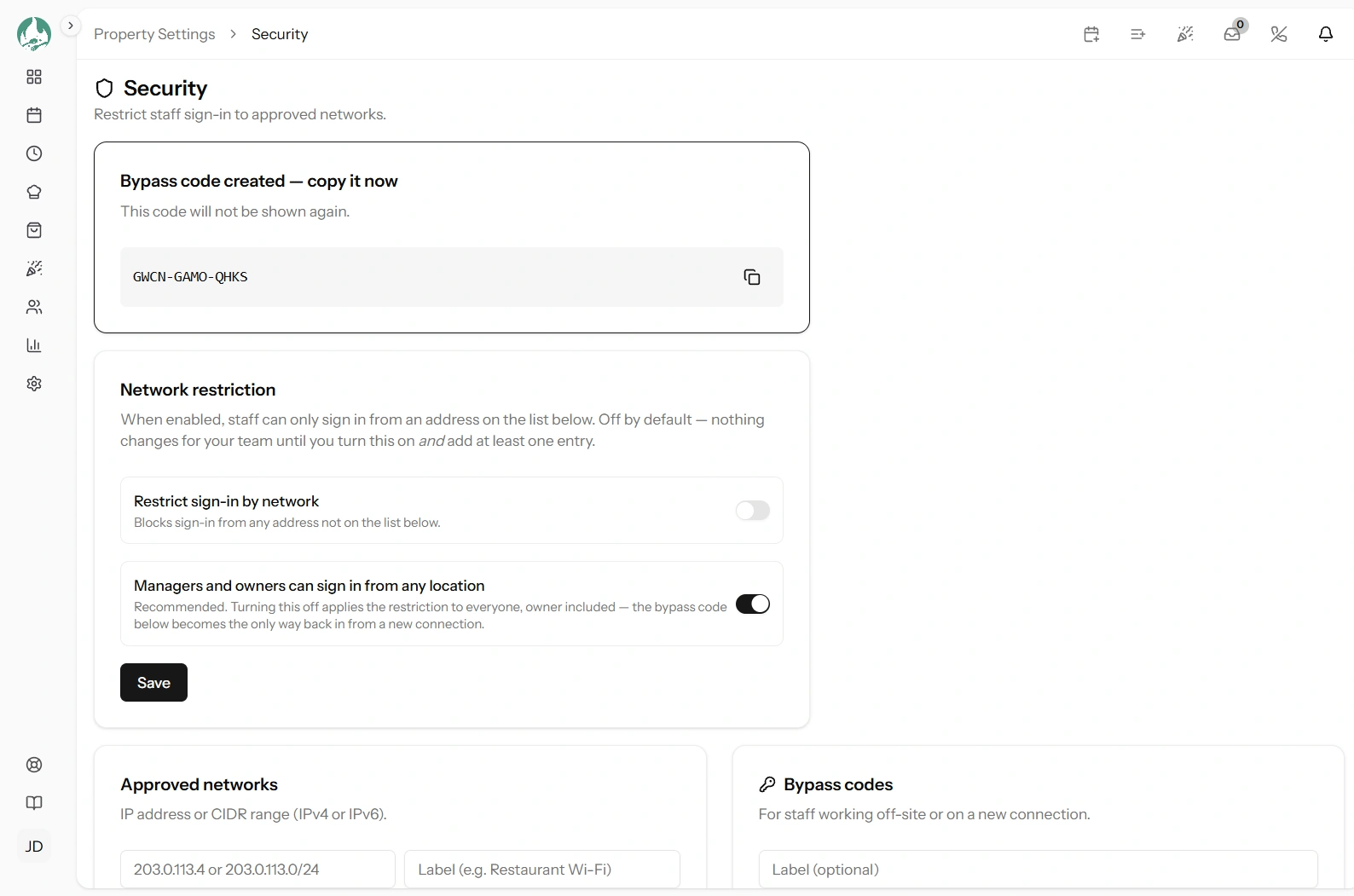
It is shown once
Copy it now. Only a scrambled version is kept, which can check a code but cannot reproduce it — so nobody, including Tabledoo, can look it up for you afterwards.
Lose it and you issue another. That takes ten seconds, so do not agonise over it.
Choosing expiry and uses
| Situation | Expiry | Uses |
|---|---|---|
| One person, one evening | 12 hours | 1 |
| A Manager working from home this week | 168 hours | 5 |
| A three-day pop-up with several staff | 72 hours | 10 |
| Your own emergency reserve | 168 hours | 1 |
Set both as tightly as the job allows. A code for one person tonight should be one use and twelve hours. Every extra use and hour is time the code is worth stealing.
Note that a code is used up by use, not by person. A five-use code given to one forgetful Manager who signs in on a phone, a laptop and a tablet is already three-fifths spent.
How somebody uses it
They sign in normally — property code, email, password — and land on the blocked page. There they enter the code, and they are through. Full detail for the person on the receiving end is in "You're blocked" — what to do.
Two things to tell them:
- Capitals and dashes do not matter. The code is read flexibly, so typing it in lower case is fine.
- There is a "remember this connection" option. If they tick it, their current address is added to your allowlist for 12 hours — so they are not re-entering the code all evening. Useful, and worth knowing about, because it means one code can quietly open a location for half a day.
Revoking a code
Revoke it from the same page and it stops working immediately, whatever its expiry or remaining uses.
Revoke when the person no longer needs it, when the job is done, when somebody leaves (link Editing and removing staff), or the moment you think a code has been seen by anyone else.
Revoking does not sign anybody out. Somebody already through on that code stays in for their current session. If you need them out now, change their password too (link Editing and removing staff).
Do not keep one long-lived code in a group chat
This is the mistake worth naming, because it is the convenient one.
A week-long, hundred-use code pasted into the staff WhatsApp group defeats the entire allowlist. It is now a second password, shared with everybody, sitting in an app on personal phones, readable by anyone who picks up an unlocked handset — and it stays valid for whoever leaves next.
If you find yourself wanting that, the honest conclusion is that the allowlist is not right for your restaurant. Turn it off and use two-factor authentication instead, which protects accounts without needing a shared secret (link Two-factor authentication).
Better habits
- One code per person per occasion, single use where you can.
- Send it directly to the person, not to a group.
- Label every code so you can tell later who had what.
- Revoke when done rather than letting it expire.
- If a location needs access repeatedly, add it as an allowlist entry with a clear label. That is what entries are for (link Managing allowlist entries).
Keep one in reserve
Issue a single-use, week-long code and put it in your password manager, or printed in the safe. Not on the restaurant's network, and not only on a device that lives at the restaurant.
It is the answer to the situation the allowlist creates: your connection's address changes overnight and nobody can get in. With a code in your pocket that is a two-minute fix; without one it is a phone call to your internet provider before you can open.
Because codes expire after at most a week, replacing the reserve code needs to be a habit — set a recurring reminder, or reissue it whenever you next visit the Security page.
Good to know
Issuing, using and revoking are all recorded in the audit log, including the address a code was used from — so you can always see where a code was redeemed (link The audit log).
A code does not change anybody's permissions. It only gets them past the network restriction; their role still decides what they can do.
Codes are per restaurant, not per person. Whoever has the characters can use it, which is the whole reason to keep the uses low.
Attempts are rate-limited, so a code cannot be guessed by trying repeatedly.