API keys
What this covers
Creating, scoping, using and revoking API keys. Requires the API Access feature and the
manage-settings permission. At Property Settings → API Keys
(/settings/api-keys).
Creating a key
- Name — up to 100 characters. Name it after the integration that will use it: "Website booking form", "Lightspeed till". Not "key 1".
- Scopes — at least one. See below.
- Keep alive — whether the key never expires. See below.
- Create it.
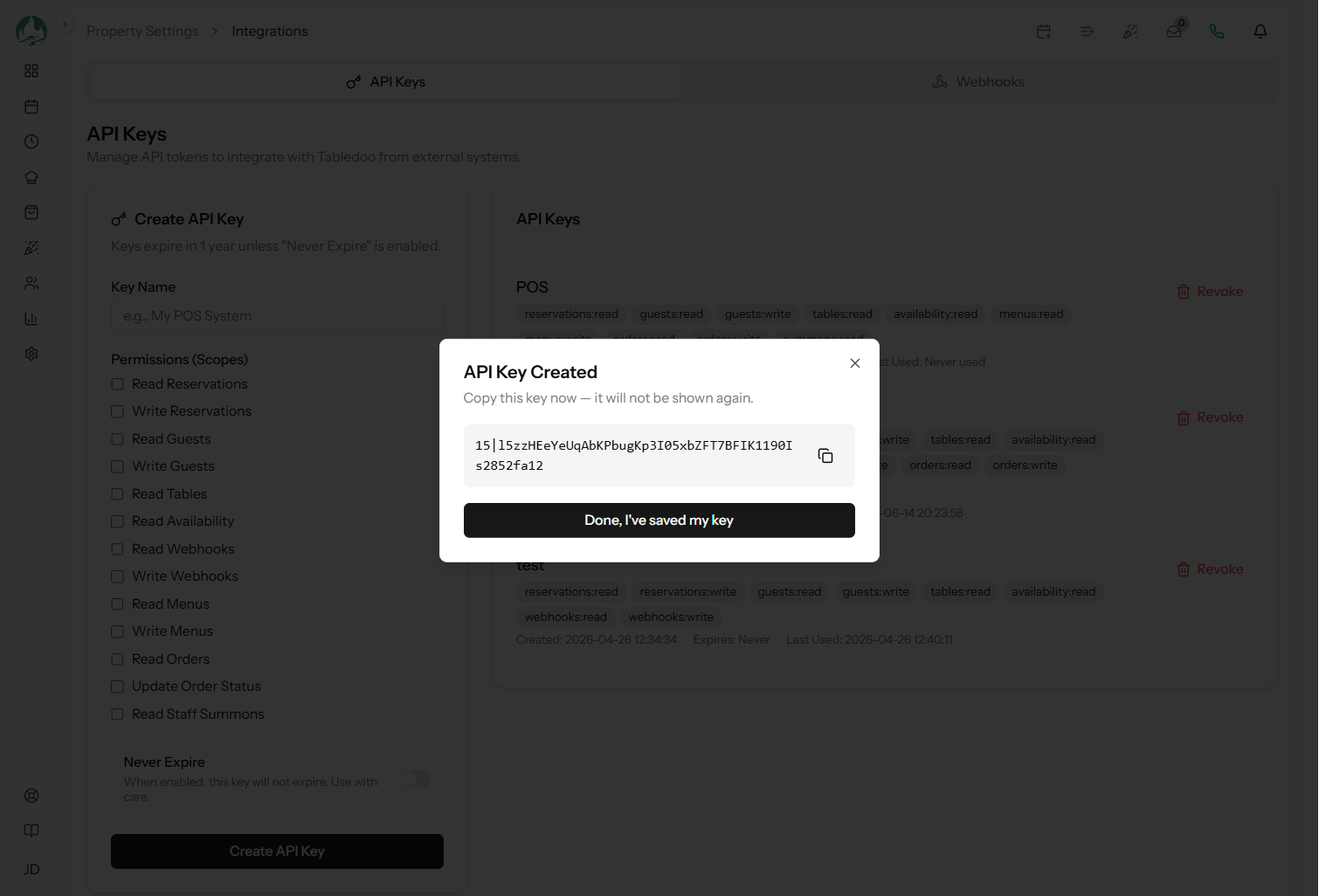
The key is shown once
Copy it immediately. Only a scrambled version is stored, which can verify a key but cannot reproduce it — so nobody, including Tabledoo support, can retrieve it later.
Lost it? Delete that key and create another. Do not leave the orphan behind.
Scopes: give the least that works
This is the part worth taking seriously, and the reason a key is safer than a password.
Thirteen scopes, in read and write pairs: reservations, guests,
menus, orders and webhooks have both; tables,
availability and summons are read-only.
A key can only do what its scopes allow. Anything else returns a 403 naming the missing
scope.
| Integration | Scopes it actually needs |
|---|---|
| Booking form on your website | availability:read,
reservations:write |
| Dashboard that only displays bookings | reservations:read,
tables:read |
| CRM or mailing-list sync | guests:read |
| Kitchen screen | orders:read, orders:write,
summons:read |
| POS pushing the menu | menus:write |
Notice how small those lists are. A booking form needs no ability to read your guest book, and a mailing-list sync needs no ability to write anything. A leaked read-only key cannot change your diary — which is the entire argument for scoping properly.
Expiry
By default a key expires one year after you create it. Choose keep alive and it never expires.
Both are legitimate, and the choice deserves a moment:
- Let it expire for anything temporary, or where you would rather be forced to review it. The trade is that it stops working on that date and the symptom is an integration that silently breaks a year later, long after anybody remembers why.
- Keep alive for a production integration you depend on. Then put a calendar reminder to rotate it yourself once a year, rather than having a date chosen for you.
If you choose expiry, write the date down somewhere your future self will look. A key quietly expiring is one of the harder faults to diagnose, because nothing changed at your end.
The choice is made once and cannot be changed later. A key has no edit — only create and delete — so switching a key between expiring and never-expiring means creating a replacement, updating whatever uses it, and deleting the old one. Decide at creation.
Sending it on a request
As a bearer token in the Authorization header:
curl https://your-domain/api/v1/ping \
  -H "Authorization: Bearer 42|abcdef0123456789..."
The key includes a | character and everything before and after it matters — pass it
verbatim. A missing or malformed key returns 401.
One key per integration
Do not share one key across your website, your till and your dashboard. One key each, named for its job, because:
- You can revoke one without breaking the others.
- Each gets only the scopes it needs.
- The last-used time tells you whether an integration is still alive.
- When something misbehaves, you know which system to look at.
Revoking a key
Delete it. Access stops immediately — the next request with that key gets a
401.
Revoke when an integration is retired, when a key may have been exposed, or when a developer or agency stops working with you (link Editing and removing staff).
Note that keys belong to the restaurant, not to a person, so removing a staff account does not revoke the keys they created. That is an easy gap to leave open — make key rotation part of your when-someone-leaves routine.
Security hygiene
- Never put a key in front-end code. Anything in a web page or a mobile app can be read by anybody. A key belongs on a server.
- Never commit one to a code repository, public or private. Use environment variables.
- Never send one over chat or email. If you must, revoke and reissue afterwards.
- Rotate rather than share. If two parties need access, issue two keys.
- Check the last-used times occasionally and delete keys nothing is using.
The front-end point is the one that actually goes wrong. A developer wiring a booking form sometimes calls the API straight from the browser because it is quicker — which publishes your key to every visitor. The form must talk to your own server, and your server holds the key.
Rate limits scale with your plan
Requests are counted per minute per key. The allowance is 60 per minute unless your plan grants more (link Your plan and what it includes).
Exceed it and you get 429. Your integration should:
- Respect the retry hint in the response headers and wait.
- Back off progressively rather than retrying immediately in a loop.
- Not retry a write blindly — it may have succeeded. Check before recreating.
Normal integration traffic is nowhere near the limit. Hitting it usually means polling too eagerly — which is the problem webhooks solve (link Webhooks).
Good to know
Keys are unaffected by staff roles. A key's scopes are its own; it is not tied to a role or a person.
Losing the API Access feature stops all keys working, with a 403. The keys
themselves are not deleted and resume on re-upgrade (link
Changing your plan).
Keys survive suspension in storage but not in use — resolve the payment and they work again (link A failed payment, and suspension).