Webhooks: getting events pushed to you
What this covers
Registering an endpoint so Tabledoo notifies your system when something happens. Requires the
Webhooks feature and the manage-settings permission. At
Property Settings → Webhooks (/settings/webhooks).
Why webhooks beat polling
Without them, a system that wants to know about new bookings has to keep asking — every minute, all day, almost always to be told nothing has changed. That is slow to notice, wasteful, and runs you into the rate limit.
A webhook inverts it: Tabledoo calls you the moment something happens. One request, at the moment it matters. If you are integrating anything that needs to react promptly — a kitchen screen, a till, a notification — this is the right tool.
Registering an endpoint
- Name — up to 255 characters. What it is: "Kitchen screen", "CRM sync".
- URL — where to send the requests. Must start with
https://; plainhttp://is refused. - Events — at least one. Choose only what you will act on (link Webhook event reference).
- Keep alive — whether the signing secret never expires. See below.
- Register it.
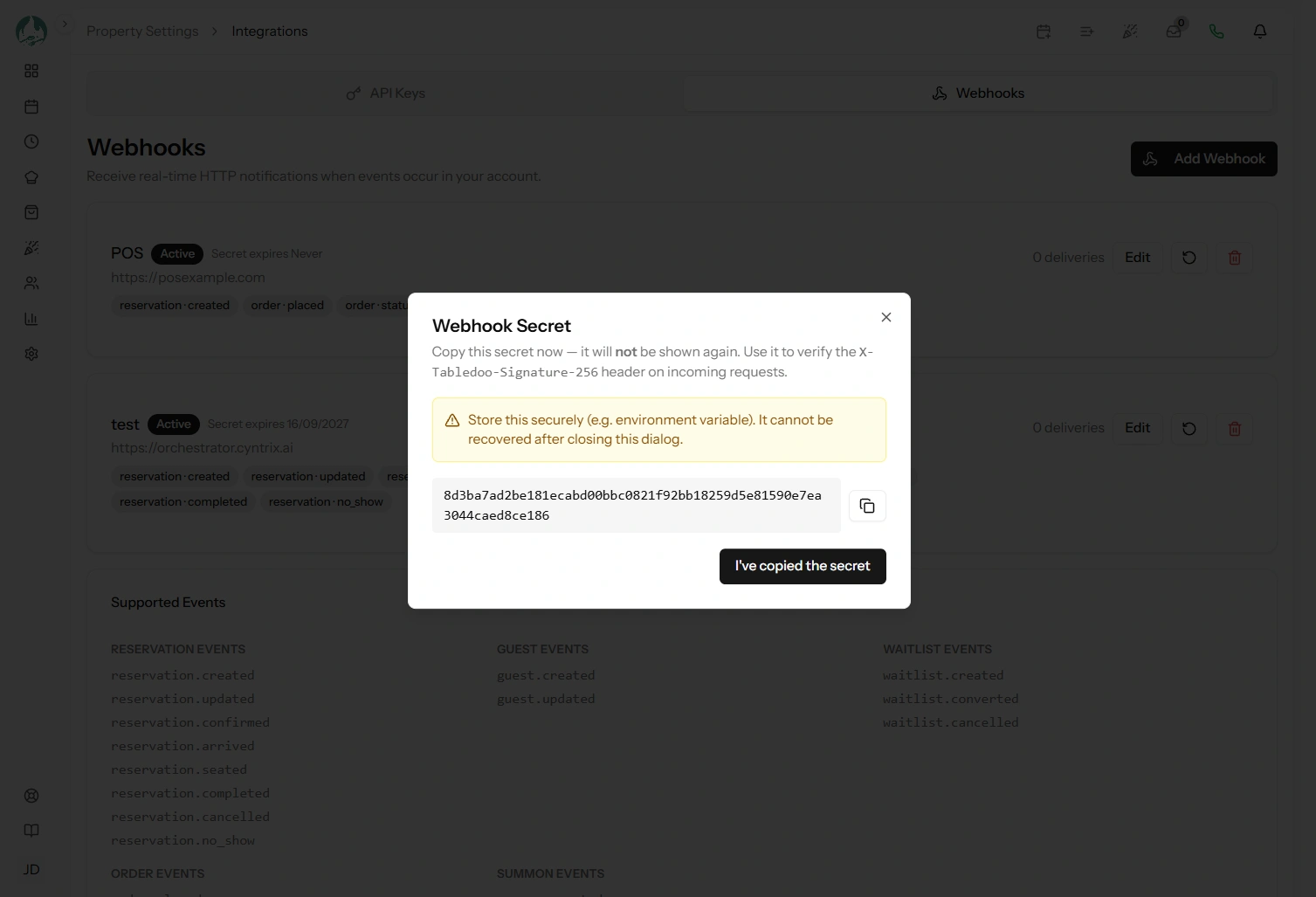
The signing secret is shown once, immediately afterwards. Copy it now — your endpoint needs it to verify requests, and it cannot be retrieved later, only replaced (link Verifying and rotating your signing secret).
HTTPS is required
Not a preference. Webhook payloads contain guest names, phone numbers and email addresses, and
http:// would send them unencrypted. If your endpoint is not on HTTPS yet, that is the first
thing to fix.
Subscribe to what you need
Every event you tick is a request to your server, and all of them count against your plan's monthly delivery allowance. Subscribing to all fifty-four "just in case" burns that allowance on events nobody reads.
Send a test payload
There is a test action on each endpoint. Use it immediately after registering, before you depend on anything.
It sends a real request to your real URL, signed exactly like a genuine one, and records the result in the delivery log — so it proves the whole path: your URL is reachable, your server responds, and your signature check works.
This is much better than waiting for a real booking to test with. Do it now, and again whenever you change your endpoint (link Delivery history and retries).
What a delivery looks like
A POST with a JSON body in a consistent envelope:
{
  "event": "reservation.created",
  "timestamp": "2026-10-02T18:14:22+00:00",
  "api_version": "v1",
  "tenant": { "property_code": "oldbell", "name": "The Old Bell" },
  "data": { ... }
}
And three headers:
| Header | What it is for |
|---|---|
X-Tabledoo-Event | The event name, so you can route without parsing the body |
X-Tabledoo-Delivery-Id | A unique id for this event — the same on every retry, so use it for idempotency |
X-Tabledoo-Attempt | Which attempt this is: 1 for the first, 2 for the first retry, and so on |
X-Tabledoo-Signature-256 | The signature to verify (link Verifying signatures) |
Failures are retried automatically
How quickly depends on the event. Orders, waiter calls and incoming calls are retried after 10 seconds and
then every 15 seconds — eight attempts in under two minutes, because a late order is useless.
Everything else gets four attempts: immediately, then after 1 minute,
10 minutes and 1 hour. Every retry carries the same
X-Tabledoo-Delivery-Id.
When the attempts run out, the delivery is marked failed, your staff get a notice in the notification bell, and you can retry it by hand. An endpoint that fails 10 events in a row is paused automatically and restarts itself an hour later (link Delivery history and retries).
What your endpoint must do
Four requirements. Get these right and webhooks are reliable.
1. Respond quickly with a 2xx
Requests time out after 30 seconds, but you should be answering in well under a second.
Acknowledge first, work afterwards — write the payload to a queue, return
200, and process it separately. Doing the work before responding is the commonest cause of
timeouts and duplicate deliveries.
2. Be idempotent
You may receive the same event more than once — a retry after your server responded slowly, or a manual
retry. Key on X-Tabledoo-Delivery-Id, remember what you have processed, and ignore repeats.
Without this, one slow response becomes two bookings in your till.
3. Verify the signature
Your URL is reachable by anybody who learns it. Without verification your endpoint will act on anything posted to it. Non-negotiable — see Verifying and rotating your signing secret.
4. Do not assume order
Events are delivered independently and retries can reorder them. A reservation.updated can
arrive before the reservation.created it followed. Use the timestamp, and treat each
payload as the current state rather than a diff.
Managing endpoints
- Deactivate to stop deliveries without losing the configuration or the secret — the right move while your server is down for maintenance.
- Update the name, URL, events or active state at any time.
- Delete to remove it permanently.
Deactivating a broken endpoint is better than letting it fail for days: failed deliveries still consume your allowance and fill the log with noise.
Two ways deliveries stop silently
Worth knowing, because neither produces an error you would notice:
- The signing secret expires. Unless you chose keep alive, it expires after a year and deliveries stop — with no delivery record explaining why (link Verifying and rotating your signing secret).
- The monthly allowance runs out. Once your plan's delivery limit is reached, further events are skipped for the rest of the calendar month, again silently.
If deliveries simply stop arriving and your endpoint is fine, check those two before anything else.
Good to know
Webhooks and API Access are separate features. You can have either without the other, and webhooks can be configured entirely from the settings page with no API key involved.
Events fire for everything — bookings made by staff, by guests online, by the chatbot and through the API alike.
Several endpoints can subscribe to the same event, each with its own secret and its own delivery log.